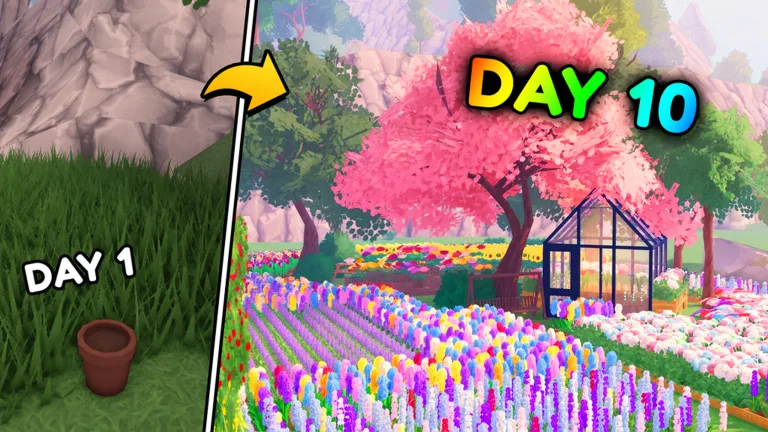
Quick Guide
- Buy initial seeds and planters from the in-game computer to start growing flowers.
- Harvest fully grown flowers to collect resources needed for crafting and sales.
- Craft bouquets and arrangements at a crafting station to fulfill customer orders.
- Serve waiting customers promptly to earn cash and keep your business flowing.
- Reinvest your earnings into more seeds, planters, and shop upgrades for growth.
Welcome to the charming world of My Flower Shop on Roblox, where you can transform a small plot into a bustling floral business! For new players, understanding the initial steps—from planting your first seed to serving happy customers—is key to building a successful shop. This My Flower Shop Roblox beginner guide will walk you through the essential first-session flow, ensuring you know exactly what to plant first, when to craft, and how to begin expanding your budding enterprise.
Starting Strong: Your First Steps in My Flower Shop Roblox
Your journey as a florist begins with a simple yet satisfying loop of growing, crafting, and selling. Mastering these fundamental activities will set you up for success.
Planting Your First Seeds
To kick off your flower shop, your very first task is to get some seeds into the ground. Head over to the in-game computer, which acts as your primary source for purchasing seeds. Once you've acquired seeds, you'll need planters. Access the build menu (often by pressing '1'), select a planter, and place it within your designated growing area. With planters ready, interact with them to sow your seeds. You can even interact with planted flowers (by pressing 'E' on PC) to encourage their initial growth.
Growing and Harvesting
After planting, your flowers will begin to grow. My Flower Shop is designed so that your flowers continue to grow even while you are offline, which is a helpful feature for busy florists. Once a flower is fully grown, it's time to harvest! Simply interact with the mature plant to collect its resources. These harvested flowers are the raw materials you'll use for crafting and selling.
Crafting Your First Arrangements
Harvested flowers aren't just for display; they're for creating beautiful arrangements that customers will want to buy. Locate your crafting station. Here, you can use your collected flowers to craft bouquets and other floral arrangements. The game's tutorial often guides you through making your first item, like a red tulip arrangement, to get you started. Crafting is essential for increasing the value of your raw flowers and meeting customer demands.
Serving Customers and Earning Cash
With arrangements crafted, it's time to sell them! Display your finished floral creations in your shop. Customers will periodically arrive and browse your selection. When a customer is ready to purchase, they will indicate their choice. Serve them promptly to complete the sale and earn cash. This cash is the lifeblood of your business, allowing you to buy more supplies and expand. The quicker you serve, the more customers you can assist, and the more money you'll make.
Expanding Your Floral Empire
Once you've established a steady flow of growing, crafting, and selling, your next goal is to expand. Reinvesting your earnings wisely is crucial for long-term growth in My Flower Shop.
Reinvesting in Your Shop
The cash you earn from sales should be used to improve and enlarge your operation. Return to the computer to purchase more seeds, allowing you to grow a wider variety of flowers or increase the volume of your most popular blooms. You'll also want to buy more planters to accommodate your expanding inventory. Consider where you place these new additions to create an efficient and aesthetically pleasing shop layout.
Early Upgrades and Purchases
Beyond just seeds and planters, My Flower Shop offers various upgrades to boost your efficiency and capacity. Look for manager options, which might include upgrades that improve aspects of your shop. You can also craft additional utility items, like more crafting stations or display units, to handle increased customer traffic and product variety. Adding elements like chairs for customers, as seen in the game's early stages, can also contribute to a welcoming shop environment.
Essential Tips for New Florists
- Prioritize the Basics: In your first session, focus on understanding the core loop: plant, grow, harvest, craft, sell. Don't get overwhelmed by advanced features too early.
- Monitor Your Cash: Keep an eye on your earnings. Reinvesting in more seeds and planters is usually the best first step towards expansion.
- Check the Computer Regularly: The computer is your hub for new seeds and potentially other early game upgrades.
- Offline Growth is Your Friend: Remember that your flowers continue to grow even when you're not actively playing. This makes it beneficial to plant a lot before logging off.
Maximize early earnings by crafting arrangements as soon as you have enough harvested flowers.
Selling raw flowers is less profitable than selling crafted bouquets, so prioritize arrangement creation.
Frequently Asked Questions
What is My Flower Shop on Roblox?
My Flower Shop is a Roblox experience where players cultivate flowers, craft them into arrangements, sell them to customers, and expand their very own floral business. It's a game about growth, creativity, and entrepreneurship.
How do I get started in My Flower Shop Roblox as a beginner?
As a beginner, you start by buying seeds and planters from the computer, planting those seeds, harvesting the grown flowers, crafting them into arrangements, and then selling those arrangements to customers for cash.
Do flowers grow when I'm not playing My Flower Shop?
Yes, according to the official game description, flowers continue to grow even while you are offline. This allows you to step away and return to a garden ready for harvest.
Where can I play My Flower Shop safely?
You can play My Flower Shop safely by accessing the official game page on Roblox. Look for the experience created by Magic Box Games. Here's a direct link to the official game page: My Flower Shop on Roblox.